One group, one circle of people
Family, classmates, friends, and clubs each get a group. Every group has its own color, so you can tell them apart at a glance.
Family, friends, and clubs each have their own group, so every group's plans are easy to see. What you agreed on, everyone can see. What's yours stays yours.
 Free to download, for iPhone
Free to download
Free to download, for iPhone
Free to download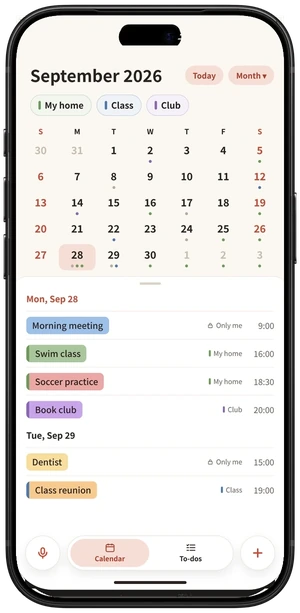
Family, classmates, friends, and clubs each get a group. Every group has its own color, so you can tell them apart at a glance.
Every plan chooses where it lives. Put it in a group and members can see it. Choose “Only me” and only you can see it.
Add a plan by saying it, or photograph a school notice. The date and time are sorted out for you.
Every group has its own color. The color bar on the left of a plan tells you which group it belongs to. Tap a group above to hide its plans for a moment.
You can also go by a different name in each group: Mom in “My home”, and your own name in the club.
Members of “My home” can all see it, and the calendar marks it with the group's color bar.
When you add a plan, choose where it goes. Put it in a group and members can see it, with the group's color bar on the calendar. Choose “Only me” and only you can see it.
Company meetings and appointments from the iPhone Calendar also show only on your own phone.
When you add a plan, choose where it goes. Put it in a group and members can see it. Choose “Only me” and only you can see it. Plans from the iPhone Calendar also show only on your own phone.
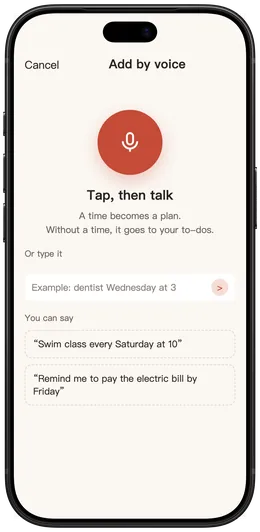
Press the microphone and say “dentist next Wednesday at 3pm”. Confirm, and it's in.
Say “dentist next Wednesday at 3pm”, and confirm.
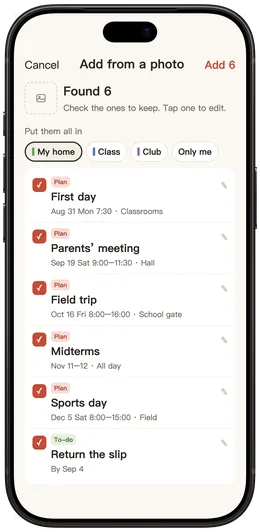
Photograph a school notice, poster, or screenshot. Wekin finds the dates and times. You just check the ones to keep.
Photograph a school notice, and the date and time are sorted out.
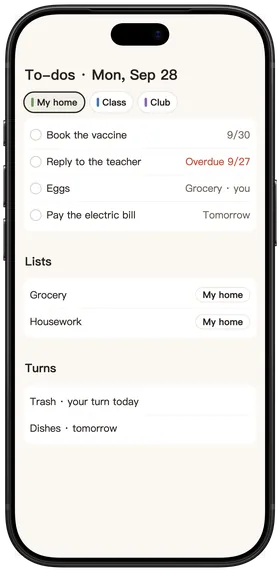
Pay the electric bill, book a vaccine. Only you can see these.
Shopping and household lists live in the group. You can assign them to family, and check them off when they're done.
Shopping and household lists live in the group. You can assign them to family.
Taking out the trash, washing dishes. Wekin lines up whose turn it is today.
Taking out the trash, washing dishes. It lines up whose turn it is today.
Company meetings and appointments on your iPhone can show on the same calendar. Only you can see them. They are not shared with the group.
Company meetings and appointments on your iPhone can show together. Only you can see them.
Ask Siri what's on today, or say a sentence to add something.
Most families are fine on the free plan. When groups and lists grow, and you want more colors, upgrade to Wekin+.
Yes. Each person installs Wekin on their own iPhone, taps the invite link you sent, or enters the invite code, and joins the group.
Only you. Plans set to “Only me”, private to-dos, and plans brought in from the iPhone Calendar are not shared with any group.
Yes. Each group has its own color, and every plan sits on the same calendar. You can also have a different name in each group.
iPhone only, for now.
Download free, make a group, and send the link to your family.

Scan with the iPhone camera to download